JavaScript is disabled in your browser. enable it to enjoy the full features of Tracxn.

Google Sheets Add-on

Google Sheets Add-on

Workbook Integration

Seamlessly integrate Tracxn data into your Google Sheets workflows with our powerful Add-on.

Install from Marketplace
Overview
Credits

About Google Sheets Add-on

1What is Google Sheets Add-on?

Tracxn Google Sheets Add-on provides you access to 1M+ companies directly into Google Spreadsheets.

2What data do I get using Google Sheets Add-on?

Get the latest data for over 35 fields like Founded Year, Location, Total Funding etc. More details are available in section.

3How do I get access to Google Sheets Add-on?

You need to have credits balance and premium access to be able to use the Tracxn Google Sheets Add-on. .

4How are the Google Sheets Add-on Credits utilized?

We deduct one credit for every company's data that is fetched.
E.g: If you have requested for details for 15 fields for 10 companies, we will deduct 10 credits.

Installation Guide

Step 1: Install the Add-on

Install from Marketplace
Or
  1. Open any Google Sheets.
  2. Click on Extensions → Add-ons → Get add-ons
  3. Search for "Tracxn" in the top-right search bar
  4. Click Install

Step 2: Connect to Your Tracxn Account

  1. Go to Extensions → Tracxn → Open
  2. Click Login
  3. Sign in using your Tracxn username and password.

Note:

If your Google account is admin-managed, your access to Marketplace apps may be restricted.
Here are 3 solutions your admin can take:

1Install for the Domain

Directly install the add-on and assign access to specific users. See How

2Enable Marketplace Apps for Users

Allow users to manually install Tracxn add-on. Step-by-step

3Allowlist the Add-on

Add Tracxn to your organization's approved apps. Learn More

How to use Add-on
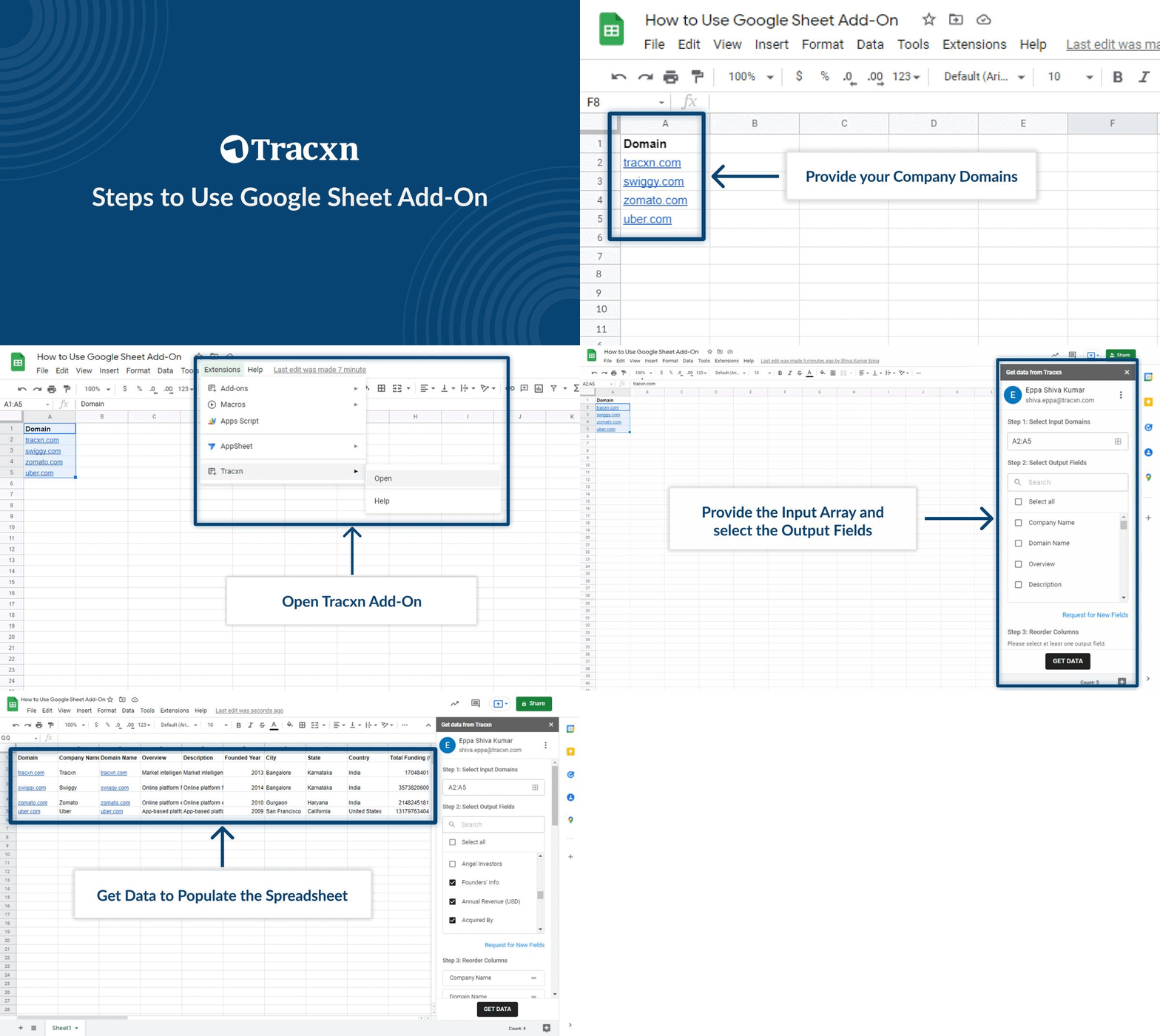
How to use Add-on

Reference

List of output fields Tracxn google add-on supports

Company
Sample output
Company Name
Uber
Tracxn URL
https://platform.tracxn.com/companies/iPOgfVgYtYmen5ipJMy6Q5jV_PojSJWUFAFu9zmfTnA/uber.com
Link to visit company profile page of selected domain
Company Website
https://www.uber.com/
Overview
Online-ride hailing and on-demand service platform
Brief description of company
Description
Uber offers an online-ride hailing and on-demand service platform. The platform enables users to book various services like taxi-hailing, food-delivery, freight solutions, and more. Also, it offers self-drive electric vehicle rentals, corporate transportation, and more...
Long description of company
Founded Year
2019
Company Stage
Public
Soonicorn Club Status
Unicorn
Is Deadpooled
No
Founders' Info
Travis Kalanick; Co-Founder; travis@10100fund.com; https://linkedin.com/in/traviskalanick; CEO CSS and 10100, ex-Founder Red Swoosh, Co-Founder Scour, Akamai Technologies. UCLA 1998 Karun Arya; ka@uber.com
Annual Revenue (USD)
120000000
Latest Valuation (USD)
150000000
Total Employee Count
5300
Location
Sample output
Country
United States
State
California
City
San Francisco
Funding
Sample output
Total Funding (USD)
13179763404
Latest Funded Date
Sep 13, 2019
Latest Funded Amount (USD)
1200000000
Sector
Sample output
Practice Areas
Consumer Travel and Hospitality Tech Auto Tech
Feed Name
Road Transport Tech
Business Models
Road Transport Tech > Ride Hailing > Cars > Taxi > Intracity > Aggregator
Investors
Sample output
Institutional Investors
Cota Capital, Man Capital, Scott Belsky, Tao Capital Partners, Fidelity Investments
Angel Investors
Christopher Kile, Troy Carter, Steve Jang, Justin Caldbeck
Acquisitions & IPO
Sample output
Acquired By
walmart.com
Acquired Date
May 3, 2018
Acquired Amount (USD)
16000000000
Acquisition Type
Business Acquisition
Stock Ticker
NYSE:UBER
IPO Date
May 10, 2019
Social Media Link
Sample output
LinkedIn
https://linkedin.com/company/uber-com/about
Twitter
https://twitter.com/uber
Facebook
https://facebook.com/uber
Metrics
Sample output
Editor's Rating
5
Tracxn Score
79
Other
Sample output
Part Of
ubereats.com is part of uber.com
Part of' returns domain of the parent company
Same As
Paytm.ca is same as Paytm.com
'Same as' returns other domains that can be used to access this company
Companies Acquired
Car Next Door
'Companies Acquired' returns names of the companies acquired by the company in consideration